In today’s digital landscape, securing online data is more critical than ever. For websites powered by WordPress, connecting to the MySQL database using SSL (Secure Sockets Layer) is a fundamental step towards enhancing security, especially when WordPress is running on one server and MySQL on another. SSL encrypts the data transferred between your WordPress site and the MySQL database, protecting sensitive information from potential eavesdroppers and cyberattacks. By leveraging SSL, we can ensure integrity and privacy of the transferred data. In this guide, we’ll explore how to connect WordPress to a MySQL database using SSL, along with the technical details involved in setting up a secure connection between the servers.
- On MySQL server, disable the requirement for SSL connection for a user. This is to make sure, we can connect to the database without using SSL first. We’ll enable it later!
ALTER USER 'wp-user'@'%' IDENTIFIED BY 'wp-user-password' REQUIRE NONE; - Verify we can connect from WordPress server to MySQL. On WordPress server, run following command in the terminal.
mysql -h db.example.com -u wp-user -p
Enter the password for wp-user. If the connection succeeds, we’re able to connect from WordPress server to MySQL database without using SSL. - On MySQL server, enable the requirement for SSL connection for a user.
ALTER USER 'wp-user'@'%' IDENTIFIED BY 'wp-user-password' REQUIRE SSL;
If we now try to connect from WordPress server to MySQL database as we did in the step number 2 without using the SSL certificate (make sure you type in the password correctly), we shall get following error message:ERROR 1045 (28000): Access denied for user 'wp-user'@'***edited-ip-address***' (using password: YES) - Use SSL certificate to connect securely. Log in from WordPress server to MySQL database, this time with the use of SSL certificate. Make sure you use the correct certificate, otherwise you won’t be able to connect! In this case I’m using certificate located in
/etc/ssl/certs/global-bundle.pemfor connecting to my AWS RDS instance.mysql -h db.example.com --ssl-ca=/etc/ssl/certs/global-bundle.pem -u wp-user -p
If we entered the password correctly, the connection using SSL should be successful. - Since you enabled the requirement for SSL connection to the MySQL database, your WordPress instance shall not be currently able to connect to it. To fix that issue, add the following line to your WordPress wp-config.php file.
define( 'MYSQL_CLIENT_FLAGS', MYSQLI_CLIENT_SSL); - To make sure the connection works from PHP as well, enter the PHP interactive mode from the command line and run following commands:
php -a$db = mysqli_init();
mysqli_real_connect($db, 'db.example.com', 'wp-user', 'wp-user-password', NULL, NULL, NULL, MYSQLI_CLIENT_SSL);
$result=mysqli_query($db, 'SELECT version();');
while($row = mysqli_fetch_array($result)) { print_r($row); };
If all goes well, it should print out your MySQL server version. Something like this: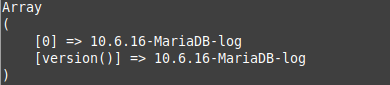
- Your WordPress instance shall successfully connect to the MySQL database again. This time using the SSL connection.

Leave a Reply